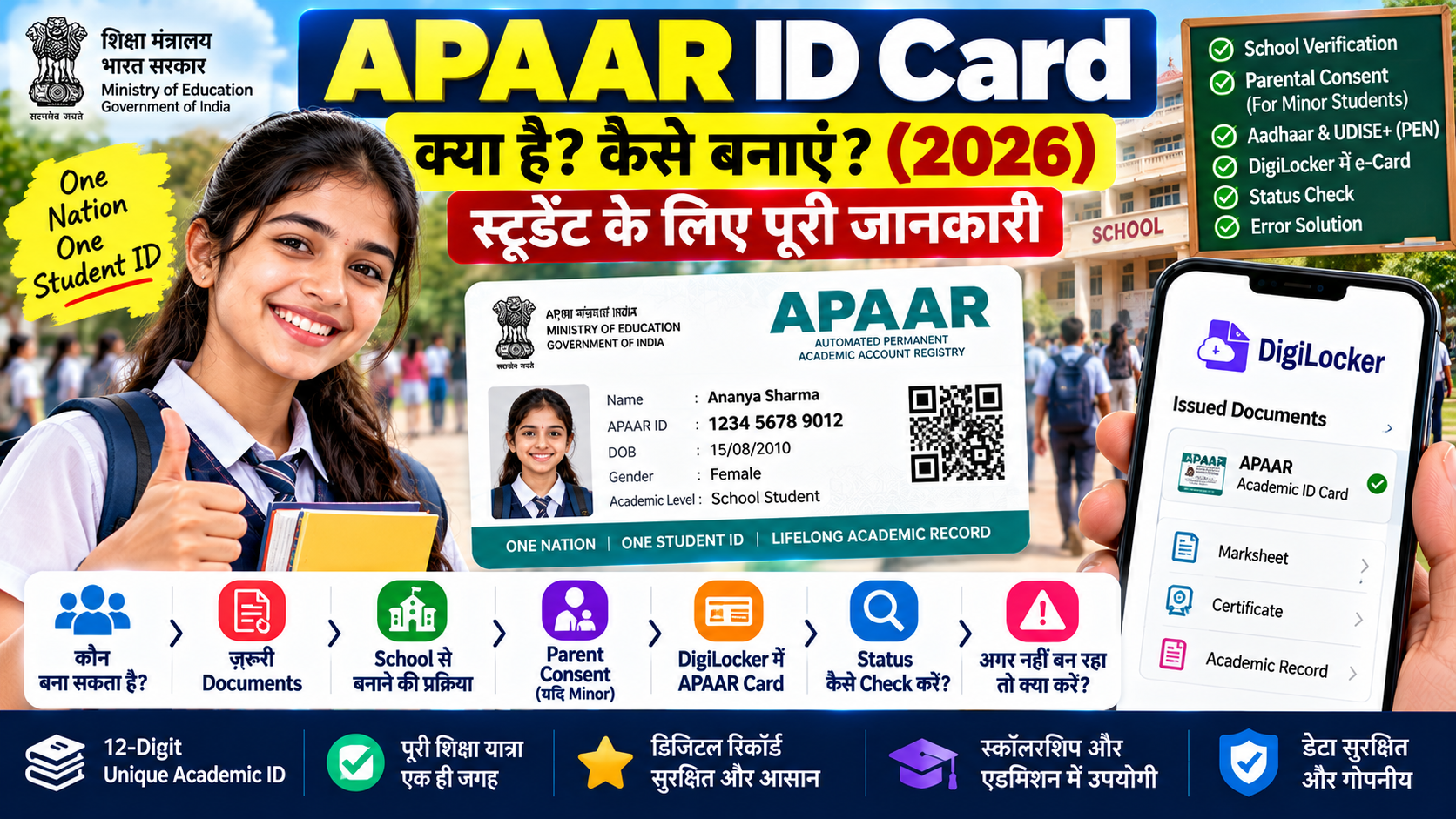
APAAR ID Card Online Apply को लेकर students और parents के मन में कई सवाल रहते हैं—APAAR ID क्या है, इसे कैसे बनवाएं, क्या mobile से खुद बना सकते हैं, DigiLocker में card कैसे मिलेगा और अगर APAAR ID generate नहीं हो रही है तो क्या करना चाहिए।
APAAR एक unique 12-digit academic ID है, जिसका उद्देश्य student के academic records को digital रूप में एक जगह जोड़ना है। इसके जरिए marksheets, certificates, degrees, diplomas, academic credits और दूसरी achievements को manage और verify करने में मदद मिलती है।
APAAR ID Kya Hai?
APAAR का पूरा नाम Automated Permanent Academic Account Registry है। इसे “One Nation, One Student ID” initiative के रूप में विकसित किया गया है और यह National Education Policy 2020 के broader digital education framework से जुड़ा है।
APAAR ID एक lifelong academic identity की तरह काम करती है। इसका उद्देश्य student की education journey को school से higher education और आगे skill development तक एक connected digital record के रूप में support करना है।
APAAR ID के क्या फायदे हैं?
APAAR का सबसे बड़ा फायदा यह है कि student के academic achievements को अलग-अलग documents में ढूंढने की जरूरत कम हो सकती है। Records digitally access और verify किए जा सकते हैं।
- 12-digit unique academic identity
- Marksheets, certificates और academic records को digitally manage करने में मदद
- Academic credits को track और transfer करने में सुविधा
- DigiLocker के साथ integration
- School और higher education के बीच academic mobility आसान बनाने में मदद
- Admission, examination, scholarship और job-related academic verification में उपयोग
APAAR ID Kaun Bana Sakta Hai?
APAAR system students के लिए बनाया गया है। लेकिन इसकी creation प्रक्रिया student की educational records और institution verification से जुड़ी होती है। खासकर school students के मामले में school की भूमिका महत्वपूर्ण है।
अगर student minor है, तो APAAR ID creation के लिए parental consent की जरूरत होती है। इसलिए इसे सामान्य website registration की तरह समझना सही नहीं है।
APAAR ID Banwane Ke Liye Kya Zaroori Hai?
APAAR ID generate होने से पहले student की academic और Aadhaar information का match होना जरूरी है। Official process में PEN (Permanent Education Number) भी mandatory है।
- Student Name
- Date of Birth
- Gender
- Mobile Number
- Mother’s Name
- Father’s Name
- Aadhaar details
- UDISE+ में दर्ज PEN
सबसे जरूरी बात यह है कि UDISE+ student record में नाम और Aadhaar पर नाम में mismatch नहीं होना चाहिए। mismatch होने पर APAAR generation fail हो सकती है।
APAAR ID Online Apply कैसे करें?
APAAR की official process में school verification प्रमुख step है। इसलिए school student के लिए सबसे पहले अपने school से APAAR creation के बारे में जानकारी लेना सही तरीका है।
School Student के लिए APAAR बनाने की प्रक्रिया
- अपने school में APAAR ID creation के लिए संपर्क करें।
- Student की demographic details verify कराएं।
- अगर student minor है तो parent/guardian की consent पूरी करें।
- School के जरिए identity authentication process पूरा कराया जाता है।
- UDISE+ में उपलब्ध student record और PEN के आधार पर APAAR generation process आगे बढ़ती है।
- APAAR ID successfully generate होने के बाद इसे DigiLocker account में push किया जाता है।
इसलिए पुराने articles में दिए गए “बस website खोलकर खुद नया APAAR number बना लें” वाले तरीके को follow न करें।
APAAR ID DigiLocker में कैसे देखें?
APAAR ID generate होने के बाद उसका virtual card student के DigiLocker account में उपलब्ध कराया जाता है। इसे DigiLocker के Issued Documents section में देखा जा सकता है।
DigiLocker में APAAR Card Check करने का तरीका
- DigiLocker app या website खोलें।
- अपने account में login करें।
- Issued Documents section खोलें।
- APAAR से संबंधित document खोजें।
- Available virtual APAAR card को open करके details check करें।
APAAR ID Status कैसे Check करें?
अगर आपको पता नहीं है कि student की APAAR ID generate हुई है या नहीं, तो school authority से status check कराया जा सकता है। UDISE+ के APAAR module में student की generation status information उपलब्ध होती है।
APAAR generate होने के बाद DigiLocker में virtual card दिखाई देना भी successful generation का संकेत है।
APAAR ID Generate नहीं हो रही है तो क्या करें?
अगर APAAR generation fail हो जाती है, तो अक्सर student data में mismatch या incomplete information की समस्या हो सकती है। उदाहरण के लिए Aadhaar और UDISE+ record में नाम या दूसरी demographic details अलग होने पर generation रुक सकती है।
APAAR Error ठीक करने का तरीका
- School record में student का नाम check करें।
- Aadhaar पर name और date of birth verify करें।
- UDISE+ में student information सही है या नहीं, school से confirm करें।
- PEN details सही हैं या नहीं, यह check कराएं।
- गलत information होने पर पहले correction कराएं।
- Correction के बाद APAAR generation process दोबारा शुरू कराएं।
क्या APAAR ID और ABC ID एक ही हैं?
APAAR और Academic Bank of Credits (ABC) closely connected systems हैं, लेकिन इन्हें पूरी तरह एक ही चीज समझना सही नहीं है। APAAR student की broader lifelong academic identity है, जबकि ABC academic credits को accumulate, manage और transfer करने से जुड़ा system है।
APAAR और ABC के integration की वजह से students के academic credits और credentials को digitally manage करने में सुविधा होती है।
APAAR ID में कौन-कौन से Records जुड़ सकते हैं?
APAAR ecosystem का उद्देश्य student की academic journey से जुड़े कई प्रकार के records को digitally connect करना है। इसमें scorecards, marksheets, gradesheets, diplomas, degrees, certificates, credits और co-curricular achievements जैसे records शामिल हो सकते हैं।
कौन-सा record कब दिखाई देगा, यह संबंधित educational institution और awarding body द्वारा data upload और integration पर depend करता है।
APAAR ID बनाते समय किन गलतियों से बचें?
- Aadhaar और school record में अलग-अलग name spelling न रखें।
- Date of birth mismatch को ignore न करें।
- Duplicate APAAR ID बनाने की कोशिश न करें।
- किसी unknown person को Aadhaar OTP न बताएं।
- Fake APAAR websites या unofficial apps से बचें।
एक व्यक्ति के लिए केवल एक unique APAAR ID होनी चाहिए। Duplicate ID बनने की स्थिति में पुराने records पर असर पड़ सकता है, इसलिए दोबारा ID बनाने की कोशिश बिना जरूरत न करें।
APAAR ID में Data और Privacy कैसे काम करती है?
APAAR academic और personal information को digital ecosystem में manage करता है। Information access और sharing consent तथा authorised systems के माध्यम से होती है। Students और parents को अपनी details सही रखने के साथ यह भी ध्यान रखना चाहिए कि login information और authentication details किसी अनजान व्यक्ति के साथ share न करें।
APAAR ID Card Online Apply FAQs
क्या APAAR ID घर बैठे खुद बनाई जा सकती है?
School students के लिए APAAR creation में school verification और authentication की महत्वपूर्ण भूमिका होती है। Minor student के लिए parental consent भी आवश्यक होता है।
APAAR ID कितने अंकों की होती है?
APAAR एक unique 12-digit ID है।
APAAR ID DigiLocker में कब दिखाई देती है?
APAAR ID successfully generate होने के बाद इसे student के DigiLocker account में push किया जाता है और Issued Documents section में virtual card देखा जा सकता है।
APAAR ID generate नहीं हो रही है तो क्या करें?
सबसे पहले Aadhaar और UDISE+ student record में name, date of birth और दूसरी demographic details का mismatch check कराएं। जरूरत पड़ने पर school से correction करवाएं।
क्या APAAR ID जरूरी है?
APAAR education ecosystem में academic identity और record management के लिए बनाया गया है। इसके use और implementation की requirements educational institution और applicable process के अनुसार अलग हो सकती हैं।
APAAR ID और ABC ID में क्या अंतर है?
APAAR lifelong academic identity से जुड़ा है, जबकि ABC मुख्य रूप से academic credits के accumulation, accounting और transfer को manage करता है। दोनों systems integrated हैं।
Conclusion
APAAR ID Card Online Apply को केवल एक सामान्य online form की तरह नहीं समझना चाहिए। Student की details पहले educational records में verify होती हैं, minor के लिए parental consent लिया जाता है और UDISE+ में PEN के आधार पर APAAR generation की प्रक्रिया आगे बढ़ती है।
APAAR generate होने के बाद उसका virtual card DigiLocker में उपलब्ध हो सकता है। अगर generation fail हो रही है, तो सबसे पहले Aadhaar और school record में details का mismatch check कराना चाहिए।